Integrating High-Quality Winter Forest Clipart into Professional Creative Workflows
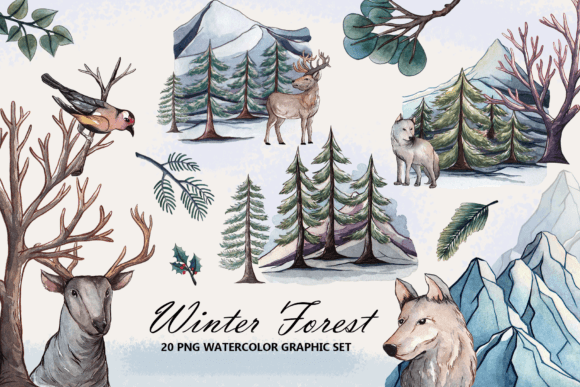
In the fast-paced environment of modern digital design and content creation, the difference between a project that feels rushed and one that exudes professionalism often lies in the quality of the assets used. For professionals ranging from graphic designers and marketers to small business owners and educators, finding resources that balance aesthetic appeal with technical usability is a constant challenge. Winter Forest Clipart represents more than just a collection of images; it is a strategic asset that, when integrated correctly, can streamline production timelines and elevate the visual identity of seasonal campaigns. This high-quality hand-painted winter watercolor clipart set, comprising 20 distinct elements, serves as a versatile foundation for a wide array of applications, from physical print materials to dynamic web designs.
Understanding where these assets fit within a broader creative process is essential for maximizing their value. Whether you are preparing holiday greeting cards, designing social media graphics, or assembling educational materials, the preparation phase is critical. Before opening your design software, consider the specific requirements of your output medium. The distinction between screen-based and print-based workflows dictates how you should handle file resolution and composition. This particular set addresses both needs by providing 20 individual PNG files with transparent backgrounds at 300 DPI and 3000 x 3000 pixels, alongside 5 pre-composed PNG scenes at 1200 x 1200 pixels. Having access to both isolated elements and ready-made compositions allows creators to adapt their workflow based on the time available and the level of customization required.
Strategic Asset Selection and Preparation
The first step in utilizing Winter Forest Clipart effectively involves organizing your digital workspace. When you download the ZIP folder, the immediate task is to extract and catalog the files. Professional efficiency relies on organization; rather than leaving files in a generic downloads folder, create a dedicated directory for your winter project. Inside, separate the individual elements from the composed scenes. This separation ensures that when you are in the middle of a tight deadline, you can quickly locate the specific tree, snowflake, or animal illustration you need without sifting through unrelated assets.
The technical specifications of these files play a pivotal role in their compatibility with various tools. The 300 DPI resolution is the industry standard for high-quality printing. If your workflow involves producing physical items such as DIY projects, paper designs, or scrapbooking pages, this resolution ensures that the watercolor textures remain crisp and detailed, avoiding the pixelation that plagues lower-resolution web graphics. Conversely, the 5 PNG compositions provided at 1200 x 1200 pixels are optimized for digital environments. These are ideal for quick deployment on social media platforms, blog headers, or email newsletters where file size and load speed are priorities over print fidelity. Recognizing which file type serves which stage of your project prevents costly errors, such as sending a low-res image to a professional printer or uploading an unnecessarily large file to a website.
Integration Across Diverse Project Types
Once your assets are organized, the integration phase begins. The versatility of hand-painted watercolor elements allows them to bridge the gap between traditional artistic sensibilities and modern digital layouts. For marketers and entrepreneurs launching winter sales or holiday promotions, these clips can be used to soften the corporate edge of a brand, adding a touch of warmth and authenticity. In a typical workflow, you might start with a brand template in software like Adobe Photoshop, Canva, or Affinity Designer. By importing the transparent PNGs, you can layer the forest elements behind text or product shots, creating depth without obscuring key information.
Consider the workflow for creating Winter Cards. The process often starts with selecting a color palette that complements the cool blues, whites, and earthy tones of the watercolor forest. Because the background is transparent, you have the freedom to place these elements on any colored cardstock or digital background. You can use the individual trees to frame a central message or scatter the smaller elements to create a subtle texture. For those engaged in Scrapbooking or paper crafts, the high resolution allows for scaling the images up or down without losing the delicate brushstroke details that define the watercolor style. This adaptability means a single asset can be reused across multiple projects, ensuring visual consistency while reducing the time spent searching for new graphics.
In the realm of web design and blogging, the implementation strategy shifts slightly. Here, the focus is on user experience and loading times. While the 3000 x 3000 px files are excellent for retina displays, they may need optimization before being published online. A prudent workflow involves resizing these images to the exact dimensions needed for the webpage and compressing them using tools like TinyPNG or Squoosh. This step maintains visual quality while ensuring the page loads quickly, a crucial factor for SEO and user retention. The pre-composed 1200 x 1200 px scenes are particularly useful here, as they often require minimal editing and can serve as instant hero images or featured graphics for articles discussing winter topics, seasonal trends, or year-end reviews.
Enhancing Efficiency Through Layering and Composition
A significant advantage of working with a cohesive set of 20 elements is the ability to build complex scenes rapidly. Instead of sourcing images from disparate locations—which often results in clashing styles and inconsistent lighting—you can construct entire landscapes using pieces from the same hand-painted collection. This approach supports a modular design process. For instance, an educator creating winter-themed lesson plans can combine a specific tree, a snowdrift, and an animal character to create unique illustrations for each worksheet. This not only saves time but also creates a unified visual language that helps students associate the materials with a specific theme or unit.
When executing these designs, pay attention to the interaction between the watercolor textures and other design elements. Watercolor art inherently possesses a soft, organic edge. To maintain this aesthetic, avoid pairing these clips with harsh, geometric vectors unless you are intentionally aiming for contrast. Instead, complement them with serif typography or handwritten fonts that echo the human touch of the painting. In terms of layering, utilize the transparency of the PNG files to create parallax effects in digital presentations or to add subtle shadows in print layouts. Placing a semi-transparent white overlay between the clipart and the background can further integrate the elements, making them feel like they belong naturally within the design rather than sitting on top of it.
Quality Control and Long-Term Usability
Maintaining high standards throughout the production process is non-negotiable for professionals. Before finalizing any project involving Winter Forest Clipart, conduct a thorough quality check. Zoom in to 100% to ensure that the edges of the watercolor elements are clean and free from unwanted artifacts. Verify that the colors appear consistent across different devices if the output is digital, or request a proof if the output is print. The 300 DPI specification is a guarantee of potential quality, but it is up to the user to preserve that quality through correct export settings.
Furthermore, think about the long-term utility of these assets. A well-organized library of seasonal graphics becomes a valuable resource year after year. By archiving your completed projects alongside the original source files, you create a repository that can be tapped into for future iterations. Perhaps next year you will need a similar background for a new product launch, or a client will request a variation of a previous campaign. Having the original high-resolution elements readily available allows you to pivot quickly without starting from scratch. This forward-thinking approach to asset management is a hallmark of efficient freelancers and agencies.
Ultimately, the successful use of this winter watercolor set depends on viewing it as a tool within a larger system of creation. It is not merely a decorative addition but a functional component that influences pacing, tone, and clarity. Whether you are a hobbyist looking to personalize a holiday invitation or a publisher assembling a seasonal catalog, the process remains the same: select the right resolution, organize your files, integrate with attention to style, and verify the output. By adhering to these practical steps, you ensure that the natural beauty of the hand-painted forest elements enhances your work, delivering a polished and professional result that resonates with your audience.